LiteLLM Supply Chain Attack: Environment Variables Stolen — Why Cold Wallets Are Your Last Line of Defense
- What Happened? The LiteLLM Supply Chain Attack
- Attack Timeline
- Deep Dive: The Deadly .pth File Exploit
- Complete List of Stolen Data
- The Unique Threat to Crypto Holders
- Why ArcSign Cold Wallet Users Were Unaffected
- Wallet Types vs Supply Chain Attack Resilience
- If You're Affected: Emergency Response Plan
- Developer Self-Defense Guide: 5 Key Measures
- FAQ
What Happened? The LiteLLM Supply Chain Attack
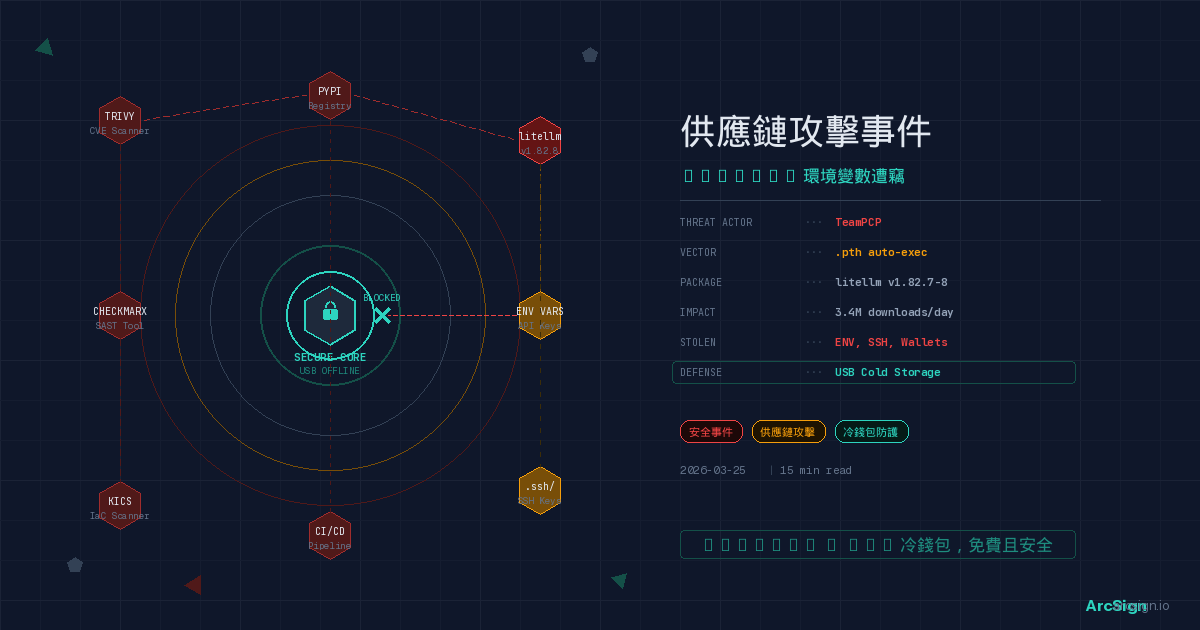
On March 24, 2026, the open-source AI community faced a nightmare scenario. LiteLLM, a popular Python package downloaded over 3.4 million times per day, was found to be compromised in a supply chain attack. The attacker published two backdoored versions on PyPI — v1.82.7 and v1.82.8 — that silently stole all environment variables from infected systems, including API keys, cloud credentials, SSH keys, and even cryptocurrency wallet files.
LiteLLM is a widely-used AI proxy framework that allows developers to call OpenAI, Anthropic, Google, and other LLM APIs through a unified interface. According to Wiz's research, LiteLLM is present in 36% of cloud environments. The potential blast radius of this attack is staggering.
LiteLLM averages 3.4 million downloads per day and exists in 36% of cloud environments. The malicious versions were live on PyPI for approximately 3 hours before being quarantined. Any system that installed and ran the affected versions during this window should assume all accessible credentials have been compromised.
What makes this incident particularly alarming is that the attackers didn't directly compromise LiteLLM. Instead, they first infiltrated another well-known open-source security tool — Aqua Security's Trivy vulnerability scanner. Through Trivy's CI/CD pipeline, the attackers obtained LiteLLM's PyPI publishing credentials (PYPI_PUBLISH token), then published the backdoored versions as a legitimate maintainer. This is the terrifying reality of modern supply chain attacks: the tools you trust may already be weaponized.
Attack Timeline
This was a carefully orchestrated, multi-stage operation carried out by a threat actor known as TeamPCP. Here is the complete timeline:
TeamPCP compromised Aqua Security's open-source vulnerability scanner Trivy. Trivy is widely used in CI/CD pipelines for security scanning and is trusted infrastructure for many open-source projects.
TeamPCP expanded the attack to Checkmarx and KICS GitHub Actions, using these compromised CI/CD tools as pivot points to harvest additional target credentials.
Using PyPI publishing credentials obtained through Trivy, TeamPCP published backdoored versions 1.82.7 and 1.82.8 as a legitimate LiteLLM maintainer. The malicious code executed automatically when Python started.
Security researchers detected the anomaly and PyPI's team emergency-quarantined the affected versions. However, during those 3 hours, a significant number of users had already downloaded and executed the malicious package.
Deep Dive: The Deadly .pth File Exploit
The most ingenious aspect of this attack was its exploitation of an obscure Python mechanism — .pth files.
Python's .pth files were originally designed to modify module search paths. But they have a deadly feature: if a line in a .pth file starts with import, that line is automatically executed when the Python interpreter starts. This means the malicious code didn't need the user to explicitly import litellm — any Python program starting up would trigger the payload.
The malicious package installed a file named litellm_init.pth that executed every time the Python interpreter started, not just when import litellm was called. This means even running a Python script completely unrelated to LiteLLM would result in your environment variables being stolen.
Here's the complete attack flow:
User runs pip install litellm==1.82.8, and the malicious litellm_init.pth file is placed in Python's site-packages directory.
The next time any Python program starts, the import statement in the .pth file automatically executes, loading the malicious payload. The entire process is completely silent — no prompts, no warnings.
The malicious code scans the entire computer, collecting environment variables, SSH keys, cloud credentials, wallet files, and every piece of sensitive data it can find.
Collected data is encrypted and sent to attacker-controlled remote servers. The entire process runs in the background — the user is completely unaware.
Complete List of Stolen Data
According to analyses by ReversingLabs, Snyk, and Sonatype, the malicious code harvested an extremely broad range of data — essentially every piece of sensitive information on a developer's machine:
| Data Type | Specific Contents | Risk Level |
|---|---|---|
| Environment Variables | All ENV vars including API keys, passwords, tokens |
Critical |
| SSH Keys | All key files under ~/.ssh/ |
Critical |
| AWS Credentials | Access Key, Secret Key, Session Token | Critical |
| GCP Credentials | Service Account Token, Application Default Credentials | Critical |
| Azure Credentials | Client Secret, Managed Identity Token | Critical |
| Kubernetes Config | ~/.kube/config cluster access configuration |
Critical |
| Database Passwords | DB connection strings and passwords from env vars | Critical |
| Git Config | Authentication info in .gitconfig |
High |
| Shell History | Commands from .bash_history, .zsh_history |
High |
| Crypto Wallet Files | Local wallet configs and keystore files | Critical |
Many developers store API keys and wallet private keys in environment variables or local config files. This attack precisely targeted these locations. If you use MetaMask or other hot wallets, your crypto assets may already be compromised.
The Unique Threat to Crypto Holders
For cryptocurrency holders, this attack is far more dangerous than a typical data breach. The reason is simple: crypto transactions are irreversible. Once private keys are stolen and assets are transferred, they're gone forever.
A Nightmare for Hot Wallet Users
If you're a developer using MetaMask, Trust Wallet, or other browser extension/software wallets, your situation is especially precarious. These hot wallets store private keys or keystore files on local disk — exactly what the malicious code was designed to scan and steal.
Even worse, many developers store wallet private keys directly in environment variables (e.g., PRIVATE_KEY=0x...) for DeFi testing or automation scripts. The very first thing this attack harvested was environment variables — your private key was sent in plaintext to the attacker's server.
Hardware Wallet Users Aren't Completely Safe Either
Even if you use a Ledger or Trezor hardware wallet, if you've interacted with DApps through a browser wallet on an affected machine, your Token Approvals may have been exploited. While attackers can't access your private keys, stolen session tokens or authorized DApp connection data from your environment could potentially be leveraged.
The following practices were proven fatal in the LiteLLM attack: storing wallet private keys in .env files, setting seed phrases in environment variables, saving unencrypted keystore files locally, leaving commands containing private keys in shell history. These practices are completely defenseless against supply chain attacks.
Why ArcSign Cold Wallet Users Were Unaffected
Now let's address the core question: if you're an ArcSign user, the LiteLLM supply chain attack had zero impact on your crypto assets. Why? Because ArcSign's security architecture was designed from day one with exactly this type of scenario in mind.
Layer 1: Private Keys Never Exist on Your Computer
ArcSign stores private keys on an offline USB device, not on your computer's hard drive or in memory. Malicious code can scan every file, every environment variable, every folder on your machine — it won't find any private key data because the keys simply aren't there.
This is the fundamental difference between cold and hot wallets. No matter how sophisticated LiteLLM's malware is, it cannot remotely read an unplugged USB device. Physical isolation is a gap that no software attack can cross.
Layer 2: XOR Triple-Shard Encryption
Even if an attacker physically obtained your USB device (impossible in a supply chain attack), ArcSign's XOR triple-shard encryption ensures the private key never exists in complete form. Three shards are stored in different locations — missing any single shard makes key reconstruction impossible.
Layer 3: .arcsign Encrypted Backup Replaces Plaintext Seed Phrases
Traditional wallets back up with 12 or 24 seed phrase words — a single piece of paper can destroy all your assets. ArcSign's .arcsign encrypted backup file is encrypted with AES-256 upon export with no additional password to set. Even if the backup file is stolen, without the decryption key on your USB device, attackers cannot extract any valuable information.
Layer 4: mlock Memory Protection
When ArcSign briefly needs to handle private keys in memory (e.g., signing transactions), it uses mlock memory protection to prevent the OS from writing sensitive data to swap. Even if LiteLLM's malware attempted to scan memory, it cannot find private key residuals in swap files.
Layer 5: Token Approvals Management
As a final safeguard, even if you accidentally authorized a suspicious smart contract in an unsafe environment, ArcSign's built-in Token Approvals management lets you view and revoke all token approvals across 6 EVM chains. Pro users get batch revocation, helping you cut losses the moment you detect a threat.
Every attack vector in LiteLLM's malware is perfectly blocked by ArcSign's security architecture: no private keys in environment variables (USB offline storage), no keystore files on disk (XOR triple-shard), no plaintext seed phrases to steal (.arcsign encrypted backup), no traces in memory (mlock protection). This is the power of "secure by design."
Wallet Types vs Supply Chain Attack Resilience
| Attack Vector | Browser / Software Hot Wallet | Traditional Hardware Wallet | ArcSign USB Cold Wallet |
|---|---|---|---|
| Env var private key theft | Fully exposed — many devs store keys in ENV | N/A — keys in hardware device | N/A — keys on offline USB |
| Local keystore theft | High risk — encrypted keystores can be brute-forced | N/A | N/A — plus XOR triple-shard protection |
| Memory / Swap scanning | May leak private keys | Brief tx info exposure during signing | mlock protection, no swap writes |
| Backup file theft | Plaintext seed phrase — stolen means compromised | Also relies on paper seed phrases | .arcsign encrypted backup (AES-256) |
| Shell history analysis | May contain private keys or seeds | May contain operational records | No impact — keys never pass through shell |
| Malicious Token Approvals | Requires third-party tools | Requires third-party tools | Built-in Token Approvals management (6 chains) |
| Price | Free | $79–$149 USD | Free |
If You're Affected: Emergency Response Plan
If you installed or updated LiteLLM around March 24, 2026, or if you're unsure whether your environment was affected, take these steps immediately:
Run pip show litellm to confirm your installed version. If it's v1.82.7 or v1.82.8, your system has been compromised. Even if the version is different, stay vigilant if you ran pip install on March 24.
Immediately rotate all API keys (OpenAI, Anthropic, Google Cloud, etc.), cloud service credentials (AWS, GCP, Azure), SSH keys, and database passwords. Assume every credential accessible in that environment has been compromised.
If your computer had any crypto wallet private keys, keystore files, or seed phrases (even in .env files), immediately transfer all assets to a brand new wallet address — preferably an offline cold wallet like ArcSign.
Use ArcSign's Token Approvals feature or Revoke.cash to review and revoke all unfamiliar smart contract approvals. Session information obtained through the supply chain attack may have been used to initiate malicious approvals.
Upgrade to a safe version of LiteLLM, or remove it until confirmed safe. Check for suspicious .pth files. Ideally, set up your development machine fresh in a clean environment.
Developer Self-Defense Guide: 5 Key Measures
The LiteLLM incident taught every developer a harsh lesson. Here are 5 key protective measures to help you survive the next supply chain attack:
1. Completely Isolate Crypto Assets from Dev Environments
This is the most important rule. Never store real wallet private keys in your development machine's environment variables or config files. Use ArcSign cold wallet to keep private keys on an offline USB device. When you need to sign transactions, connect securely via WalletConnect. Use dedicated test wallets and test networks for development and testing.
2. Pin Package Versions, Use Lockfiles
Use pip freeze or poetry.lock to pin exact versions of all dependencies. Don't use pip install litellm (which installs the latest version) — specify a known-safe version number. Lockfiles ensure you never accidentally install a compromised new release.
3. Isolate Execution in Virtual Environments
Create independent Python virtual environments (venv or conda) for each project. Even if one virtual environment is compromised, its impact is contained to that environment and won't spread to your global Python installation or other projects.
4. Enable Dependency Security Scanning
Integrate dependency security scanning tools (like Snyk, Dependabot, Socket) into your CI/CD pipeline to check every installed package. Ironically, Trivy was one such tool — reminding us not to rely on any single security solution. Defense in depth is the only way.
5. Regularly Audit Token Approvals
Regardless of which wallet you use, regularly check and revoke smart contract approvals you no longer need. ArcSign's Token Approvals management supports one-stop viewing across 6 EVM chains, so you don't have to manually check chain by chain. This is your last safety net against unknown attacks.
Security shouldn't be an afterthought — it should be a core principle of architectural design. From day one, ArcSign adopted a multi-layer defense architecture: USB offline storage + XOR triple-shard + mlock memory protection + AES-256 encrypted backup. The LiteLLM incident proves that when supply chain attacks strike, only products that are "secure by design" can truly protect users.
FAQ
Q: How did the LiteLLM supply chain attack happen?
The threat actor TeamPCP first compromised Trivy, an open-source security scanner, and obtained LiteLLM's PyPI publishing credentials. They then published malicious litellm v1.82.7 and v1.82.8, using Python's .pth file mechanism to automatically execute when Python starts, stealing environment variables, SSH keys, cloud credentials, and cryptocurrency wallet files.
Q: What sensitive data was stolen in this attack?
The stolen data included: all environment variables (including API keys and tokens), SSH keys, AWS/GCP/Azure cloud credentials, Kubernetes configurations, database passwords, .gitconfig files, shell history, and cryptocurrency wallet files. The scope of the breach was extremely broad.
Q: How does ArcSign cold wallet protect users from this type of attack?
ArcSign stores private keys on an offline USB device with XOR triple-shard encryption. Even if malware scans every file on your computer, it cannot find any usable private key data. Additionally, the .arcsign encrypted backup (AES-256) replaces traditional plaintext seed phrase backups, making it impossible to crack stolen backup files.
Q: What should I do if I installed an affected LiteLLM version?
Assume all credentials accessible in that environment have been compromised. Immediately rotate all API keys, cloud credentials, and passwords. Check and revoke all suspicious Token Approvals. If your crypto wallet private keys existed in plaintext or decryptable form on that computer, immediately transfer all assets to a new cold wallet address.
Q: How can developers prevent supply chain attacks from threatening their crypto assets?
The most fundamental approach is to completely isolate crypto private keys from the development environment. Use a USB cold wallet like ArcSign so private keys never exist on an internet-connected computer. Additionally, pin package versions, use lockfiles, enable dependency vulnerability scanning, and run untrusted packages in isolated virtual environments.
Don't Let the Next Supply Chain Attack Steal Your Crypto
Download ArcSign for free. Offline private key storage + XOR triple-shard encryption + .arcsign encrypted backup — architecturally immune to software supply chain attacks.
Download ArcSign Free