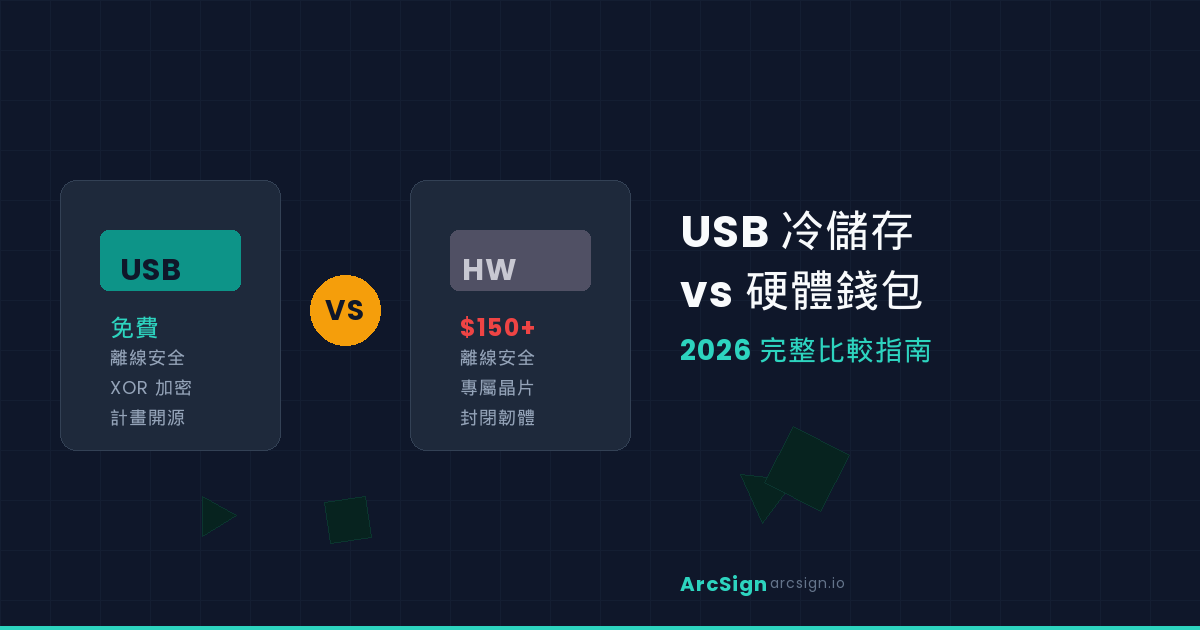
USB Cold Storage vs Hardware Wallets: Complete 2026 Comparison Guide
Why This Comparison Matters
2025 saw multiple major security incidents in the cryptocurrency space — exchange hacks, hardware wallet supply chain attacks, and even firmware update vulnerabilities from well-known brands. These events have led more and more holders to ask a fundamental question: Where is the safest place to store my private keys?
The conventional wisdom that "security = expensive dedicated hardware" no longer holds true in 2026. With advances in software encryption, an ordinary USB drive paired with the right security architecture can match or exceed the protection of a $150 hardware wallet.
This guide provides a deep comparison of USB cold storage and traditional hardware wallets across security architecture, cost, transparency, and supply chain risk — helping you make the best choice for your situation.
The Core Principle: Offline = Secure
Whether it's USB cold storage or a hardware wallet, the core reason they're secure is the same: they're offline. When your private keys aren't connected to the internet, hackers have no remote attack vector. This is the "zero attack surface" principle.
A hardware wallet's security advantage isn't in its chip or brand — it's in being "offline." When you unplug your USB drive, it's essentially a cold wallet. The only difference is the software architecture running on it.
This means that if we can build a sufficiently robust encryption and key management system on a USB drive, its security is on par with dedicated hardware. And since it doesn't require proprietary chips or firmware, the cost drops to virtually zero.
Six-Dimension Comparison
Here's a detailed comparison of USB cold storage (using ArcSign) versus mainstream hardware wallets (Ledger/Trezor) across six key dimensions:
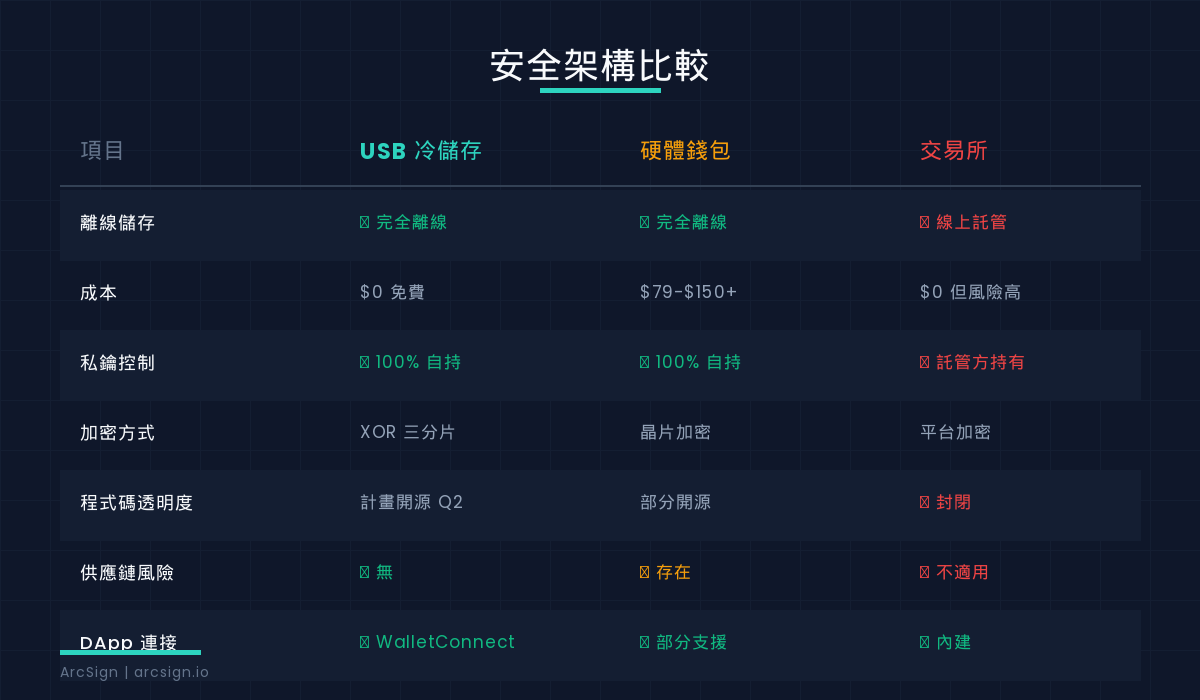
| Category | USB Cold Storage (ArcSign) | Hardware Wallet (Ledger/Trezor) |
|---|---|---|
| Offline Storage | ✓ Fully offline when unplugged | ✓ Fully offline |
| Cost | $0 (Free software + any USB) | $79 ~ $150+ |
| Encryption | XOR 3-shard + AES-256 + mlock | Secure Element (SE) chip |
| Code Transparency | Open-source planned (after 10K users) | Partially open (firmware mostly closed) |
| Supply Chain Risk | ✓ None (uses commodity USB) | ⚠ Present (must trust manufacturer) |
| DApp Support | ✓ Full WalletConnect | Partial (requires middleware) |
| Multi-Chain | ✓ Ethereum, BSC, Polygon, etc. | ✓ Wide support |
1. Cost Efficiency
This is the most obvious difference. A Ledger Nano X costs about $149, while ArcSign is completely free software that works with any USB drive you already own. For newcomers to crypto or small-balance holders, the zero-cost barrier means more people can access cold storage-level security.
2. Encryption Strength
Hardware wallets rely on a dedicated Secure Element chip to protect private keys. This works, but it also means you must trust the chip manufacturer. ArcSign takes a different approach: XOR 3-shard key protection. Your private key is mathematically split into three independent fragments — each meaningless on its own. Only when correctly combined does the key briefly materialize (1-5 milliseconds) in mlock-protected memory, sign the transaction, and immediately zero-wipe.
3. Code Transparency
Trust is the foundation of security. ArcSign plans to fully open-source its codebase once the user base exceeds 10,000, at which point every line of code will be publicly auditable. By comparison, most hardware wallet firmware is closed — you can't fully verify what's happening inside the device. The 2023 Ledger "Recover" controversy exposed exactly this trust problem. Open-sourcing is a key milestone on ArcSign's roadmap, and we're committed to releasing all source code as soon as our community is large enough.
ArcSign's Security Architecture
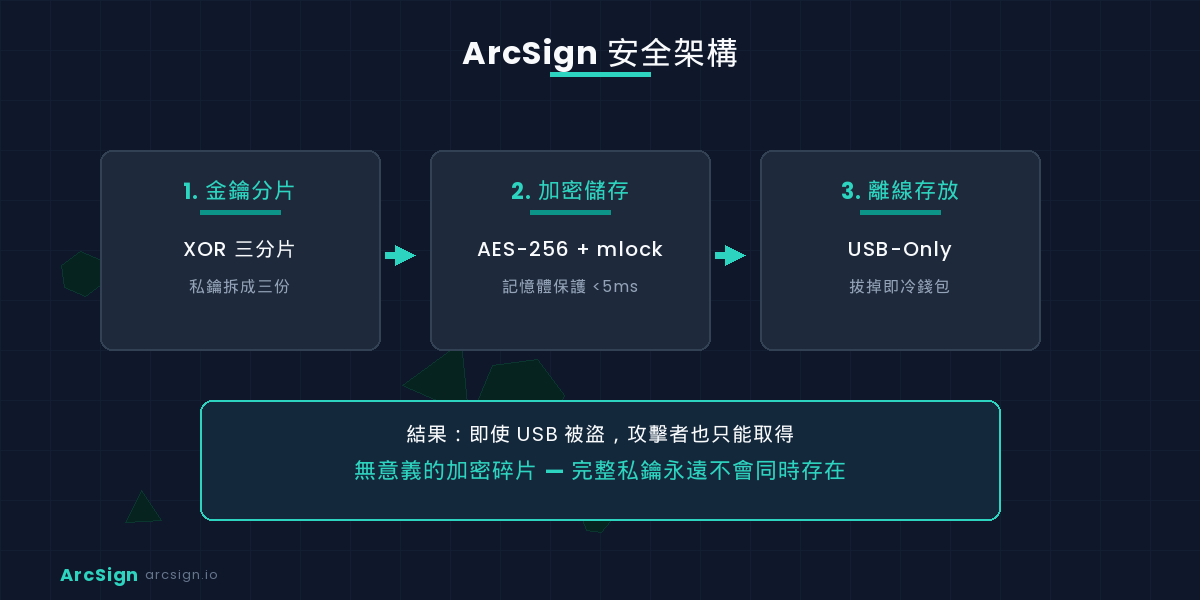
To help you understand how USB cold storage achieves strong security without dedicated chips, here's ArcSign's three-layer security architecture:
Layer 1: XOR 3-Shard Key Protection
When you create a wallet, ArcSign splits your private key into three independent fragments using XOR operations. This isn't simply "cutting the password into three pieces" — it leverages cryptographic secret sharing: any single fragment or combination of two fragments cannot derive the original key. Even if an attacker obtains your USB drive, they'll only see encrypted data fragments.
Layer 2: Memory Protection (mlock)
When you need to sign a transaction, the key is briefly reconstructed in mlock-protected memory. mlock ensures this memory segment won't be swapped to disk, preventing sensitive data from being written to permanent storage without your knowledge. The entire exposure window is just 1-5 milliseconds — the key is zero-wiped immediately after signing.
Layer 3: USB-Only Offline Storage
All encrypted data exists only on the USB drive. Unplug it, and no trace of your private key remains on your computer. This is conceptually identical to a hardware wallet's offline approach — the only difference is one uses a dedicated device, the other uses a commodity USB. But the core security logic is the same.
ArcSign's design philosophy: even if an attacker gains complete access to your USB drive, they cannot extract your private key. This is achieved through multi-layer encryption and key sharding, without relying on any hardware trust assumptions.
Supply Chain Risks: The Overlooked Blind Spot
This is an important issue many overlook when discussing hardware wallet security. When you purchase a hardware wallet, you must trust that the manufacturer hasn't planted backdoors, the device wasn't tampered with during shipping, and firmware updates won't introduce vulnerabilities.
In 2024, counterfeit Ledger devices surfaced — users received identical-looking devices pre-loaded with malicious software. These "supply chain attacks" are a real threat to hardware wallets.
USB cold storage completely sidesteps this problem. You can use any brand of USB drive because security doesn't depend on the hardware itself — it comes from the software encryption architecture. Even if your USB has been physically tampered with, XOR 3-shard encryption still keeps your keys safe.
Who Should Use USB Cold Storage?
Great Fit
Crypto beginners: zero-cost entry with no waiting for hardware to ship. Tech enthusiasts: code will be auditable once open-sourced. Budget-conscious holders: cold storage protection without spending $150. Multi-device backup: easily create backups across multiple USB drives at near-zero cost.
When Hardware Wallets May Be Better
Institutional-scale assets: if you're managing millions in assets, a dedicated SE chip provides an additional physical security layer. Completely non-technical users: hardware wallets offer a more "plug-and-play" experience for those who want zero technical involvement.
For 90% of individual users, USB cold storage with proper encryption architecture is more than sufficient. Security isn't determined by price — it's determined by architectural design.
Conclusion
The 2026 crypto security trend is clear: users are moving from custodial to self-custodial, from "trusting hardware" to "trusting architecture". USB cold storage isn't a "cheap alternative" to hardware wallets — it's a solution based on a different security philosophy, replacing hardware trust assumptions with mathematics and cryptography.
ArcSign's mission is to let everyone use the simplest tool at hand — a USB drive — to enjoy the highest level of private key protection. Free, offline, 3-shard encryption, open-source planned — this is what cold storage should look like in 2026.
Ready to Try Free USB Cold Storage?
Download ArcSign and turn your USB into your vault.
Download ArcSign Free