What Is mlock Memory Protection? Why Your Wallet Needs It
Your Private Keys Are Exposed in Memory
Every time you use a crypto wallet to sign a transaction, your private key must be loaded into your computer's memory (RAM). This is unavoidable — the signing algorithm needs to read the private key to compute a valid digital signature.
The problem is: most wallets don't properly handle the private key in memory after signing is complete. Worse still, your operating system may silently write the private key from memory to disk — a process called "memory swapping."
Once a private key is written to disk, it can persist for days, weeks, or even months. Anyone who gains access to your disk — whether a hacker, malware, or someone with physical access to your computer — could recover your private key and drain all your crypto assets.
In the 2023 LastPass breach, attackers extracted decryption keys from a developer's memory dump, leading to over $150 million in stolen crypto assets. This is exactly what happens when memory protection is insufficient.
mlock exists to solve this problem. It's an operating system "memory lock" that ensures your private keys are never written to disk.
What Is mlock? A Simple Analogy
Think of your computer's RAM as a desk, and your hard drive as a filing cabinet. Normally, when desk space runs low, the operating system moves some documents from the desk into the cabinet (swap), and retrieves them when needed later.
This is fine for ordinary documents. But what if there's a note on your desk with your bank password? You absolutely don't want that note going into the cabinet — because the cabinet has no lock, and anyone can open it.
mlock is like putting a sticker on that note telling the OS: "This document must never go in the cabinet. Keep it on the desk." When the computer shuts down, everything on the desk vanishes (RAM is volatile memory), but the cabinet's contents remain.
Technically, mlock is a POSIX-standard system call available on Linux and macOS. The Windows equivalent is VirtualLock. Once mlock is called, the OS guarantees that the specified memory pages will not be swapped to the swap partition.
Three Types of Memory Attacks
To understand why mlock matters, you need to know how attackers steal private keys from memory. Here are the three most common memory attack vectors:
1. Swap-to-Disk Attack
This is the attack type mlock directly defends against. When your computer runs low on RAM, the OS writes portions of memory to a swap partition (Linux) or pagefile (Windows). If your private key happens to be in one of those swapped pages, it ends up on disk in plaintext.
All an attacker needs is disk access (physical or remote), then they can scan the swap partition for private key data patterns. This doesn't require advanced skills — ready-made tools exist for exactly this purpose.
2. Cold Boot Attack
RAM doesn't clear instantly after power loss — data persists for seconds to minutes. Cold boot attacks exploit this: an attacker force-reboots your running computer and boots from a USB tool that reads out RAM contents before the data fades. If the private key is still in RAM, it gets captured.
mlock doesn't directly prevent cold boot attacks (since the data is indeed in RAM), but combined with ArcSign's "immediate zeroing after use" mechanism, the private key only exists in memory for a few milliseconds during signing, drastically reducing the capture window.
3. Memory Dump Attack
Malware or privileged attackers can perform a memory dump of running processes, capturing all data in a program's memory space. If the private key is actively in use, it could be captured.
The defense: minimize how long the private key lives in memory. ArcSign's signing takes just 1–5 milliseconds, after which the key is immediately wiped. An attacker would need to capture within this extremely narrow window — an exceptionally difficult feat.
| Attack Type | Risk Level | mlock Protection | ArcSign Additional Defense |
|---|---|---|---|
| Swap-to-Disk | High | Full protection | Memory lock + post-use zeroing |
| Cold Boot | Medium | Indirect | 1–5ms exposure + immediate zeroing |
| Memory Dump | Medium-High | N/A | Minimal exposure time + XOR sharding |
ArcSign's Four-Layer Memory Defense
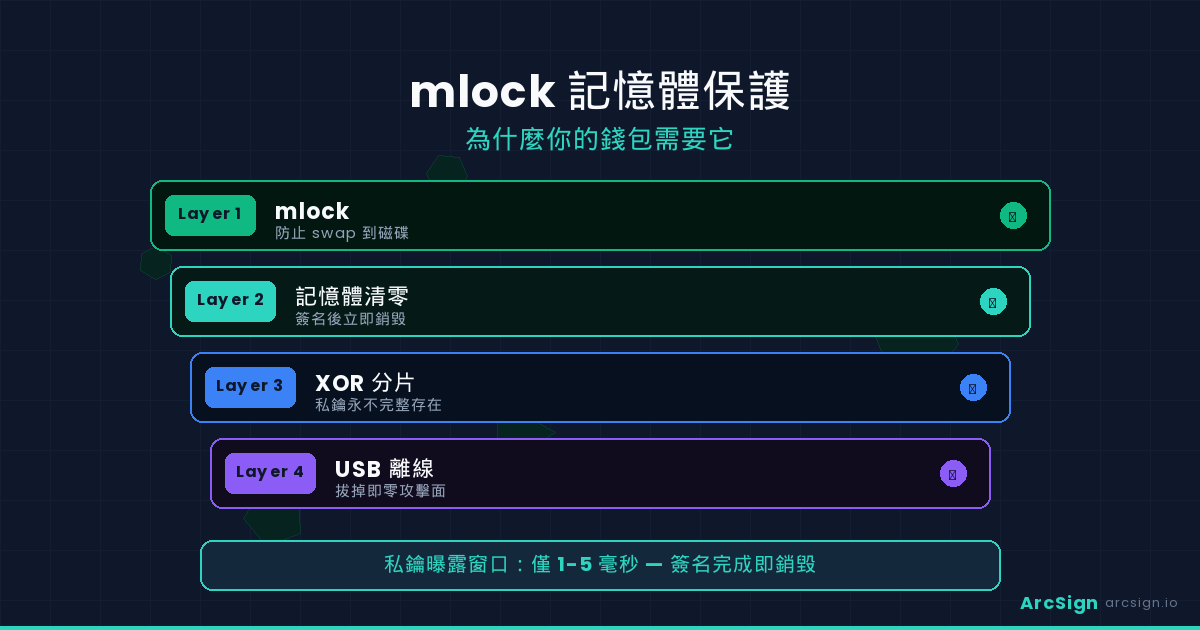
ArcSign doesn't just use mlock — it implements a comprehensive four-layer memory protection system to keep your private keys as secure as possible in every scenario:
The instant ArcSign loads a private key, it calls mlock on the memory region holding the key. This guarantees the OS will never swap those memory pages to disk. On macOS and Linux it uses syscall.Mlock(); on Windows it uses VirtualLock().
ArcSign's signing pipeline is highly optimized: load private key from USB → sign transaction → zero out immediately. The entire process takes just 1–5 milliseconds. By contrast, many software wallets keep the private key in memory for the entire duration the app is running.
After signing, ArcSign doesn't simply "free" the memory (freeing doesn't mean erasing). It actively overwrites every byte of the key storage with zeros. This ensures that even if someone reads that memory region afterward, they'll find nothing but zeros. In Go, this is done with for i := range key { key[i] = 0 } combined with compiler optimization barriers to prevent the zeroing from being optimized away.
Even on the USB drive, private keys aren't stored in raw form. ArcSign uses XOR three-shard technology to split each key into three fragments stored separately. Only all three fragments combined can reconstruct the key. This means even if an attacker breaks through memory protection, they'd capture only a fragment — not the complete key.
These four layers don't replace each other — they reinforce one another. mlock prevents disk leaks, minimal time reduces the attack window, zeroing eliminates residual data, and XOR sharding ensures even a breach of one layer doesn't yield the complete key. An attacker would need to break all four layers simultaneously — and do so within a 1–5 millisecond window.
Wallet Memory Protection Comparison
Different crypto wallets vary widely in memory protection. Here's how the major options compare:
| Protection | MetaMask | Trust Wallet | Ledger | ArcSign |
|---|---|---|---|---|
| mlock Memory Locking | Not supported | Not supported | N/A* | Supported |
| Key Exposure Time | Entire session | Entire session | Inside chip | 1–5 ms |
| Post-Use Zeroing | No guarantee | No guarantee | On-chip | Active zeroing |
| Swap-to-Disk Protection | None | None | N/A* | mlock protected |
| Key Sharding | None | None | None | XOR 3-shard |
| Price | Free | Free | $79–$149 | Free |
*Ledger uses a dedicated security chip where private keys never pass through the host computer's memory, so mlock and swap protection are "not applicable." However, Ledger carries supply chain and firmware backdoor concerns.
MetaMask and Trust Wallet are browser extensions and mobile apps, respectively. They run in sandboxed environments that don't allow direct mlock system calls — this is by design in the browser security model. JavaScript also has no concept of "memory zeroing"; when the garbage collector clears memory is entirely unpredictable.
This is exactly why ArcSign chose a native desktop architecture (Go + Tauri) over a browser extension. Only native applications can call the OS's low-level security APIs to provide real memory protection.
Encrypted Backup: The Ultimate Safety Net Beyond mlock
mlock protects runtime security — keeping your private keys from leaking to disk while your wallet is in use. But what happens if your USB is lost or damaged? You need an equally secure backup solution.
Traditional cold wallets require you to write down 12 seed phrase words with pen and paper. This approach has serious problems:
- Paper is fragile: vulnerable to water, fire, fading, and even pets
- Zero encryption: anyone who sees it can steal all your assets
- Handwriting errors: one wrong letter could make recovery impossible
- Multiple copies = multiple exposure risks: each copy is another chance for discovery
ArcSign offers a better solution: one-click export of an AES-256 encrypted .arcsign backup file.
| Backup Method | Paper Seed Phrase | .arcsign Encrypted Backup |
|---|---|---|
| Encryption | None (plaintext) | AES-256 encrypted |
| If someone finds it | Instant theft | Uncrackable |
| Ease of backup | Manually write 12 words | One-click export |
| Recovery | Type each word | One-click import + password |
| Multiple copy risk | High (each copy is plaintext) | Low (each copy is encrypted) |
| Durability | Paper degrades | Digital files last indefinitely |
Store your .arcsign encrypted backup file on a second USB drive, kept in a different physical location (e.g., one at home and one at the office). Even if one USB is damaged or lost, you can fully restore from the other. And even if someone gets the backup file, they can't decrypt it without your password.
Technical Deep Dive: How mlock Works
For technically curious readers, here's a closer look at how mlock operates at the OS level.
Virtual Memory in Modern Operating Systems
Modern OSes use virtual memory to manage RAM. Each program sees a contiguous virtual address space, which the OS maps to physical RAM pages. When physical RAM runs low, the OS selects "least recently used" pages, writes their contents to the swap partition on disk, and frees those RAM pages for other programs.
This process is transparent to applications — programs don't know their memory has been swapped. When a swapped page is accessed again, a "page fault" triggers, and the OS reads the data back from swap.
The mlock System Call Interface
import "syscall"
func protectKey(key []byte) error {
// Lock the memory pages containing the key in RAM
// OS guarantees these pages won't be swapped to disk
return syscall.Mlock(key)
}
func cleanupKey(key []byte) {
// Zero out every byte after use
for i := range key {
key[i] = 0
}
// Unlock the memory pages
syscall.Munlock(key)
}
Cross-Platform Implementation
ArcSign is written in Go, which provides cross-platform system call interfaces:
- Linux: Uses the
mlock(2)system call, subject toRLIMIT_MEMLOCKlimits (default 64KB is typically sufficient) - macOS: Uses
mlock(2)— fully supported by the Darwin kernel - Windows: Uses the
VirtualLock()Win32 API — functionally equivalent
ArcSign automatically selects the appropriate platform implementation at compile time. Users don't need to configure anything.
Why Browser Wallets Can't Do This
Browser extensions like MetaMask run in the browser's sandbox. Browsers don't allow extensions to directly call system calls like mlock — this is a design choice in the browser security model. JavaScript also has no concept of "memory zeroing"; when the garbage collector clears memory is entirely unpredictable.
This is why ArcSign chose a native desktop architecture (Go + Tauri) over a browser extension. Only native applications can call the OS's low-level security APIs to provide genuine memory protection.
Frequently Asked Questions (FAQ)
What is mlock?
mlock is a system call provided by Linux and macOS that locks specified memory pages into physical RAM, preventing the operating system from swapping them to disk. This ensures sensitive data only ever exists in volatile memory and disappears automatically when the computer is powered off.
Why do crypto wallets need mlock?
Crypto wallets must load private keys into memory to sign transactions. Without mlock protection, the OS may write private keys to the disk swap space when RAM is low. Data on disk can be recovered with forensic tools even after deletion. mlock ensures private keys never leave RAM.
Which wallets use mlock?
Most software wallets (MetaMask, Trust Wallet) run as browser extensions or mobile apps and cannot directly call mlock. ArcSign is a native desktop application (Go + Tauri) that can directly use the OS's mlock protection. Some hardware wallets like Ledger don't need mlock because they have dedicated security chips where private keys never pass through the host computer's memory.
Does mlock prevent all memory attacks?
mlock primarily prevents swap-to-disk attacks and cold boot attacks. For running processes, data in memory still requires additional protections like minimizing exposure time, immediate zeroing after use, and XOR shard protection. ArcSign combines all these techniques to provide multi-layer defense.
How does ArcSign's memory protection compare to hardware wallet security chips?
Hardware wallets use dedicated security chips (ST31, ATECC608) to isolate private keys in a separate processor. ArcSign uses USB isolation + mlock + XOR sharding + AES-256 encryption as a multi-layer software defense. Both aim to prevent key theft. ArcSign's advantages are that it's completely free, architecturally transparent (open-source planned after 10K users), and carries no supply chain risks.
Your Private Keys Deserve the Best Protection
ArcSign provides mlock memory locking, XOR sharding, and AES-256 encrypted backup — all completely free. Don't leave your private keys exposed in memory.
Download ArcSign Free